




Global Modeling
Every domain owns its models. Everyone else can build on them.
Global Modeling is two things: reference the objects another team owns instead of copying them, and push one set of naming and glossary rules into every project that needs them.
Autonomy or consistency. Most tools make you choose.
Global Modeling is two capabilities, one for each.
GLOBAL REFERENCES
Build on what another team owns
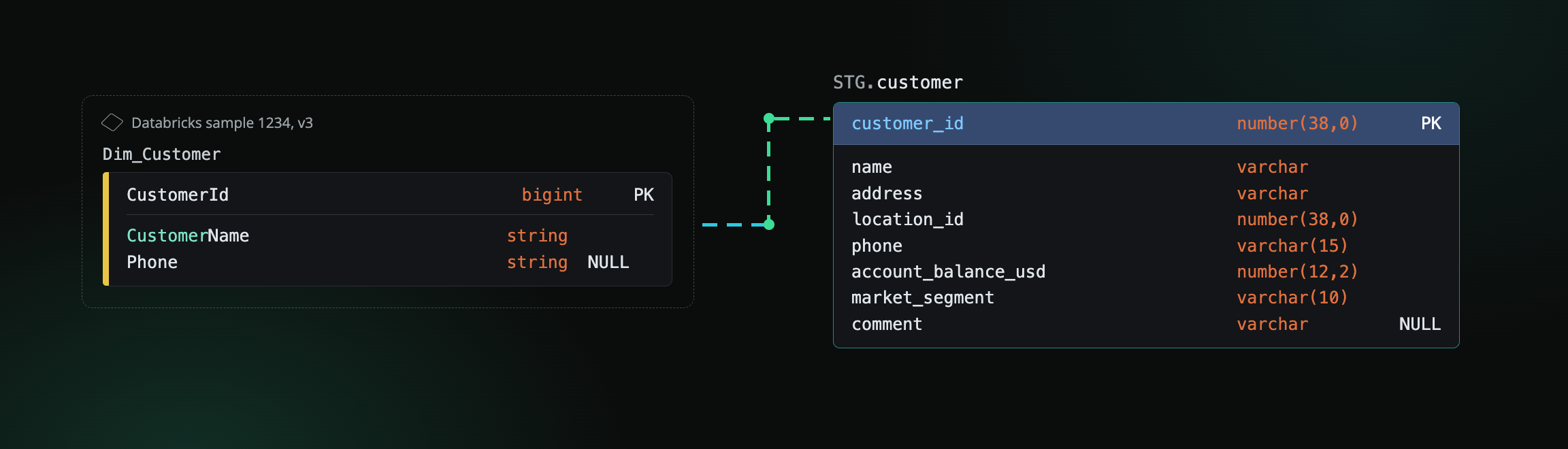
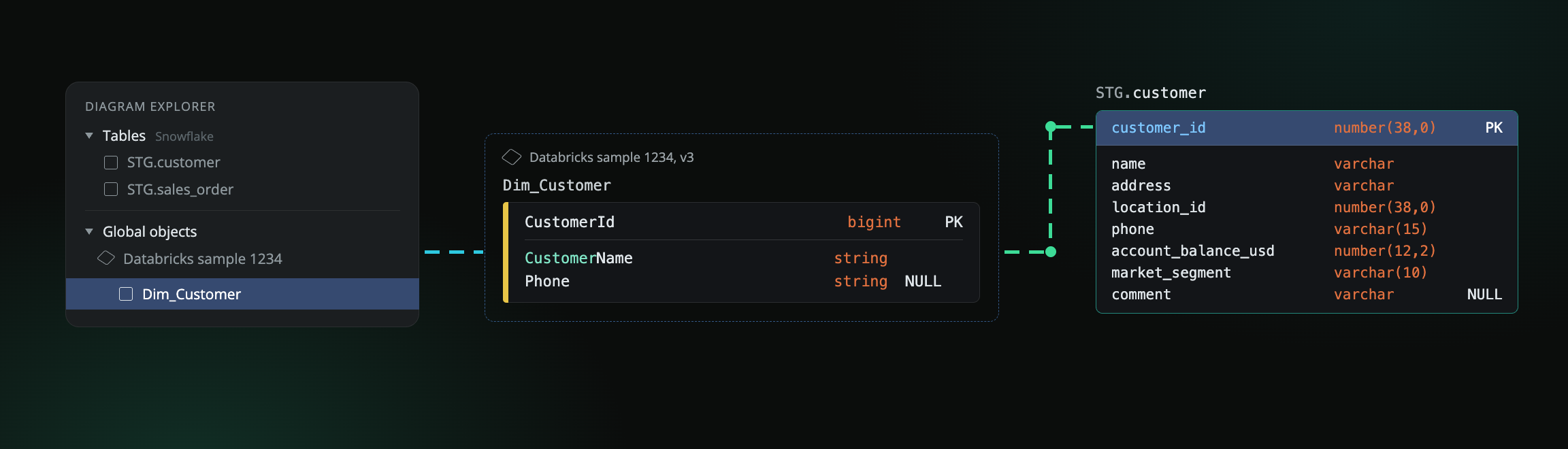
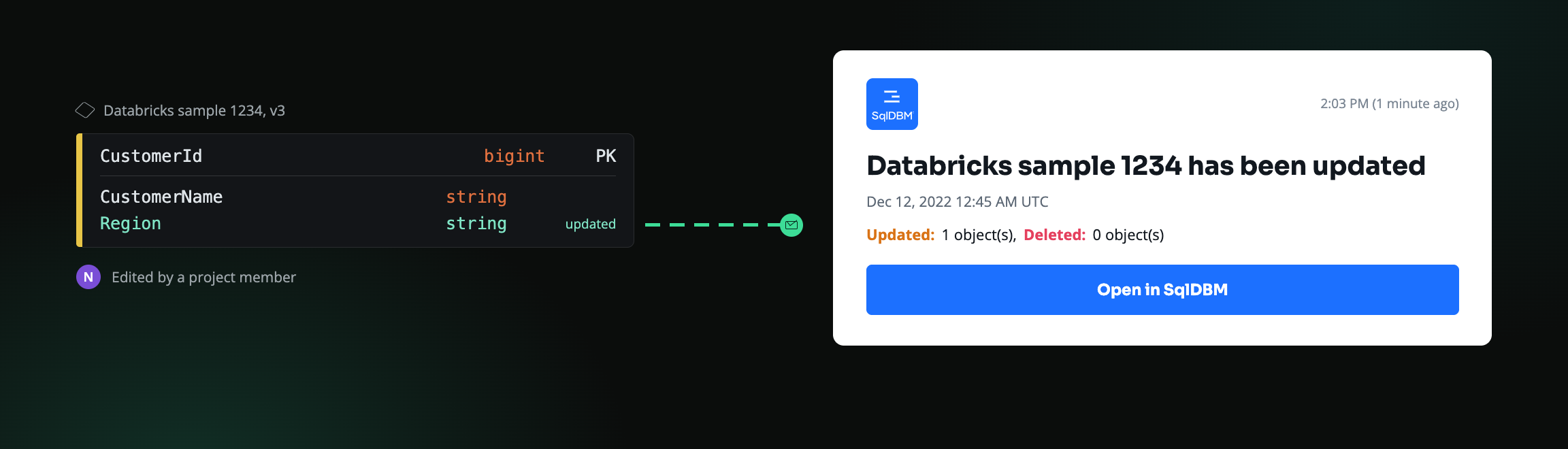
Pull objects from the project that owns them. Read-only, always current, never duplicated. You can’t break what you don’t own, and you’re told the moment something you depend on changes.
GLOBAL STANDARDS
Hold every project to the same conventions
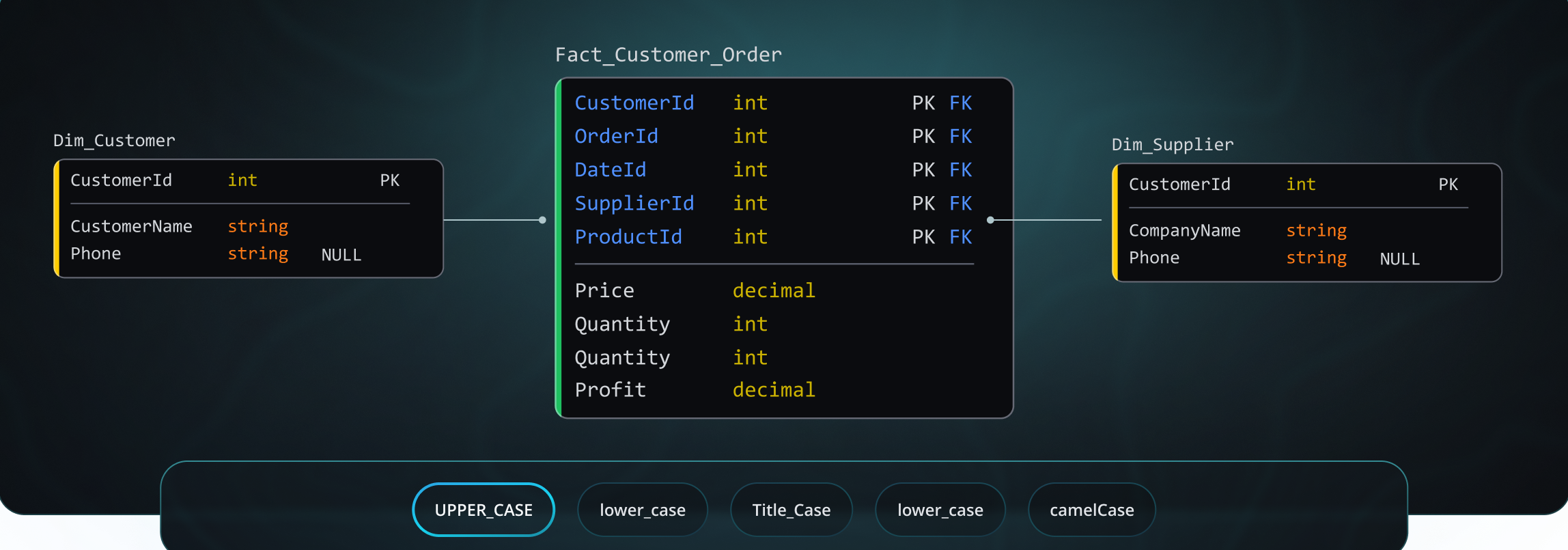
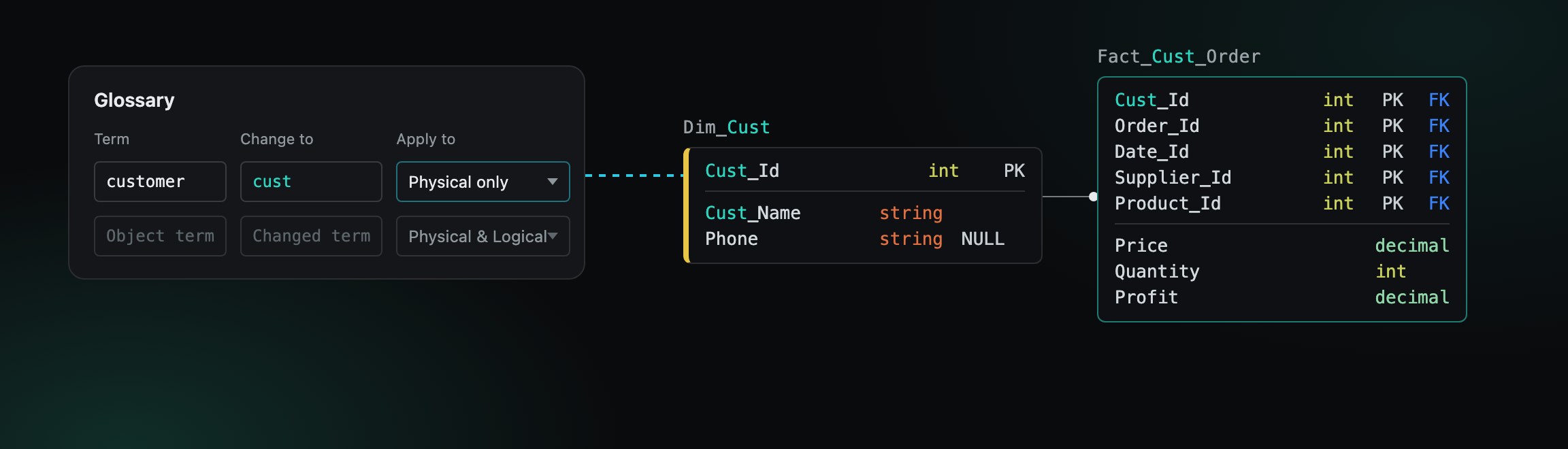
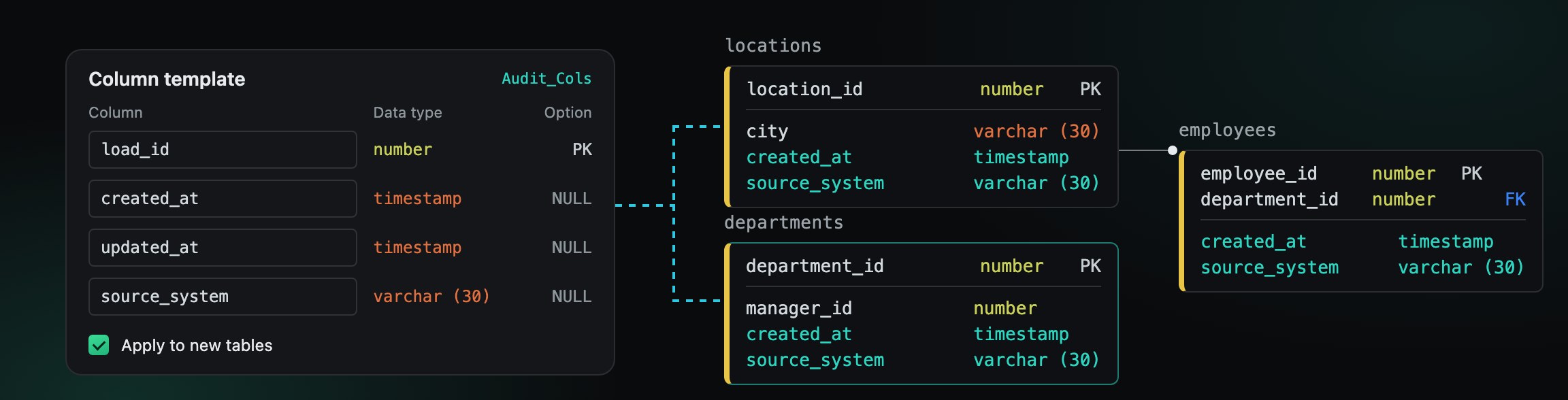
Naming, glossary and templates defined once and inherited by every project you map. Teams extend them locally. They can’t rewrite them.
What this looks like day to day
Three capabilities. Two of them are about safely sharing what a team owns. The third is about holding every team to the same rules.
GLOBAL REFERENCE
Build on another team’s model without touching it
Each domain team owns its project and publishes what the rest of the organization can build on. Other teams pull those objects in read-only, so nobody forks a copy and nothing drifts. That’s data mesh in a modeling tool: domain ownership, models consumed as products.
- Reference tables, views, functions and procedures from any project that publishes them
- Only the owning project can change them
- Snowflake and Databricks objects on the same diagram, related to each other
- Publish selectively, down to a single object or a whole schema
On-prem tools can copy an object between models. They can’t keep it connected to its owner, because that only works when every project lives in the same cloud workspace.
REFERENCE SUMMARY
See who depends on it before you change it
Every project referencing your global objects, listed in one place. Sort it, open what you have access to, and email the owners of what you don’t — the address is right there.
Every reference is a contract between two projects. The owning team knows who has taken a dependency on what; the consuming team knows the structure it built against won’t move without warning. Neither side has to ask.
- Available on every Global-enabled project
- Branches included, not just main
GLOBAL STANDARDS
Rules that travel with the projects
Your conventions live in one project and reach every project you map it to. Set them once, extend the set later, and the projects follow.
- Naming case, name mapping across environments, glossary, table and column templates, flags
- Teams can add their own glossary entries and templates alongside yours. Inherited ones are read-only.
- Conflicts are resolved in a summary. Override, rename or detach, once for all of them.
HOW GLOBAL STANDARDS WORK
Three steps, and then it’s automatic
Set up once by an admin. After that the standard travels with the work.
Define
An admin creates a Global Standards project and sets the rules every team should be working to.
Map
Choose which projects the standard applies to. Mapping is one-directional — a local project inherits the rules and can never rewrite them.
Inherit
Mapped projects pick up the standard immediately. When you change it later, every affected team is notified and can’t save until they’ve applied the update.
WHY SQLDBM
Why this only works in the cloud
Every organization has shared tables and modeling conventions. The question is what keeps them connected once more than one team is working.
Without a shared cloud model

The convention lives in a documentSomeone has to read it, remember it, and choose to follow it.

Compliance is a review you don’t have time forDrift is caught by whoever notices, whenever they notice.

Every team keeps its own copy of shared tablesFour versions of customer, drifting apart from the day they’re created.

You learn about a rename when something breaksThe failure is downstream and days later.

Nobody can say who depends on whatImpact analysis is an email thread.
In SqlDBM
The convention lives in the projectCase rules, glossary and templates are inherited by every mapped project.

Compliance is a condition of savingWhen a standard changes, mapped projects can’t be saved until it’s applied.

Teams reference the object you ownRead-only downstream, across database platforms, on the same diagram.
Downstream teams are notified at the sourceThey see what changed and pull the update on their own schedule.
Every reference is listedSortable, branches included, before you touch anything.
Two things travel downstream
What a team has built, and the rules it has to be built to. Global References share the objects. Global Standards share the conventions. Most teams use both, and they work independently.
When the parent changes, both children are notified.
A project maps to one standards project at a time.
One model, however many teams.
Built for estates measured in thousands of tables, not dozens.
~5,000 tables, one enterprise model
Mercadona, a European grocery retailer, uses SqlDBM to govern their single-source-of-truth data model, with domain teams working from the same shared template.

Protecting your data is our priority
Metadata only. Your data never leaves.
SqlDBM reads schema and metadata, never the rows in your tables. You can keep that metadata in your own region or tenancy behind your existing SSO and IP whitelisting.
Questions architects ask
Can another team change an object I own?
No. Referenced objects are read-only in every project that pulls them in. Only the owning project can change them, and every project referencing them is notified when it does.
Does a project have to be a global project to use references?
No. A project can reference objects from Global-enabled projects without being one itself. Only the project publishing the objects needs global modeling switched on.
Do our naming standards apply to objects we reference from another project?
No. Naming conventions apply to objects created in your own project. A referenced object keeps the names its owner gave it, and DDL generation and import stay with the owning project too.
Who can create and change a standard?
Account admins create the Global Standards project and choose which projects it maps to. Modelers can join the standards project team and work inside it; consumers have read-only access. No domain team can change a standard on its own.
What happens in a project when a standard changes?
The team is notified by email and in the app, and the project can’t be saved until the update is applied. Applying opens a summary of what was added, removed or modified — including any conflicts with local work — and creates a draft revision. Flags apply automatically and don’t appear in the summary.
Can a project follow more than one standard?
No. A project maps to one standards project at a time.
Can a team override an inherited rule?
No. Case rules and flags are fixed. Inherited glossary entries, name mappings and templates are read-only — but teams can add their own alongside them, so local work isn’t blocked by the standard.
What happens when a local template collides with an inherited one?
Column templates with the same name are kept and postfixed locally. Structural differences prompt a choice — override, rename or detach — and you can apply one choice to every conflict at once. Conflicting local glossary entries are set to “Not used” rather than deleted.
Can we exempt an object from the naming rules?
Yes. Objects marked “Exclude from naming rules” bypass case standards, name mapping and glossary transformation.
How do we remove a standard?
Unmap every project using it first. Once no project is mapped to it, the Global Standards project can be deleted.
Have some questions?
Trusted by data teams globally
400,000+ users globally













Your standards deserve somewhere to live.
Works with your database on day one.
Pfizer · Sanofi · DocuSign · Zendesk · 400,000+ data professionals worldwide