
In The Fast and the Spurious: Taming Semantic Drift, we opened with an email nobody wants to receive. A VP of Sales, with the CRO and VP Data in CC, wanted to know why a semantic model that had been tested and signed off was now reporting $200K less revenue than Finance. The culprit was a new order status, partially_refunded, that quietly slipped past a filter. Nothing failed. The numbers were just plausibly wrong.
That article mapped drift into three families: fragmentation drift inside the semantic layer, structural drift between the model and the data beneath it, and business and governance drift between the model and the organization it serves. It closed with a set of practices that apply regardless of technology: centralize, treat semantics as code, link the semantic layer to the physical model, test, deprecate explicitly, and plan for portability.
This article picks up where that one left off and gets specific. Practices are only as good as the tooling that makes them the path of least resistance. Here is how SqlDBM Semantic Models turn each of those practices into the default behavior, so that governing dozens of semantic models across hundreds of tables doesn’t turn into a copy-paste maintenance burden.
Semantics that live with the model
Most drift starts with distance. The physical model lives in one tool, the semantic definitions in another (or in YAML files, or in dashboards), and nobody sees both at once. When a column changes upstream, the people maintaining the semantics are the last to know.
SqlDBM closes that distance by putting semantics on the same canvas as the physical model. Switch any diagram to Semantic view mode, and every table and column exposes its analytical meaning: semantic type (Dimension, Time Dimension, or Fact), logical name, synonyms, SQL expression, sample values, and table-scoped metrics and filters. Adding a table to a semantic model never alters the physical model, but the semantic layer always references it directly. There is no second copy of the schema to fall out of sync.
Semantic models work across all database types, with full support for three formats: Snowflake Semantic Views (Cortex), Databricks Metric Views, and Ossie, the open semantic interchange standard. More on Ossie below.
Defaults and overrides: one definition, many models
Fragmentation drift is the most common family because every new model is an opportunity to copy a definition and every copy is an opportunity to diverge. The usual answer, “just keep everything in one giant model,” doesn’t survive contact with a real organization. Finance, Sales, and Marketing need different models with different scopes, metrics, and AI instructions.
SqlDBM resolves this tension with a deliberate two-layer design.
Layer 1: Semantic defaults
Semantic defaults live on the physical objects themselves: tables, columns, and relationships. For every column, you define its canonical meaning once: logical name, semantic type, synonyms, SQL expression, sample values, and whether those values are an exhaustive enum. For every table, you define the always-on metrics and filters. For every relationship, you set the default join type.
Defaults are shared by every semantic model in the project and are inherited automatically. They are the single source of truth for what a column means, independent of any particular business context.
Layer 2: Named semantic models
Named semantic models are built for specific business contexts, such as Revenue Analysis, Customer 360, or Marketing Attribution. Each one:
- Inherits every default for free. Add the
ORDERStable to a new model, and it immediately picks up every synonym, semantic type, metric, and filter already defined. - Stores only the overrides it needs. Need a different logical name for
ORDERS.AMOUNTin one model? Override that one property. Everything else keeps inheriting. - Owns the assets that belong to it alone: model-level metrics, verified queries, custom instructions for AI engines, local relationships, and per-model choices to hide objects.
Why this stops fragmentation drift
Go back to the opening email. Suppose the “completed orders” filter is defined once as a default on the ORDERS table and used by five named models across Sales, Finance, and Operations. When partially_refunded arrives, the fix happens in exactly one place, and every model that inherits the filter picks it up automatically. No hunting through YAML files, no “did we update the Finance model too?” The fix is as centralized as the definition.
Because each named model holds only its deltas, models stay small and reviewable. A new model spanning ten tables typically needs a handful of overrides instead of hundreds of re-declared definitions.
One-click sync between models and defaults
Overrides are necessary, but they’re also where drift likes to hide. An override that made sense last quarter may now be the only model still using an outdated definition. Or a team may have refined a definition in their model that everyone else should be using.
SqlDBM makes every override visible. Whenever a value in a named model differs from its default, an override indicator (a purple triangle) appears next to the field. There’s no need to diff YAML files to find out where a model deviates from the canonical definition. It’s marked right on the property.
From there, keeping the two layers in sync takes one click in either direction:
- Reset to default discards the override and re-inherits the current shared definition. This is how you retire a stale local tweak.
- Push to default promotes the override to become the new shared definition. Every other model that inherits it picks up the change immediately. This is how a good refinement in one model becomes the standard for all of them.
This is the difference between centralization in theory and centralization in practice. Without a fast way to promote and reconcile, teams copy and diverge because it’s easier. With it, the governed path is also the shortest one.
Drift detection: see it before your stakeholders do
The hardest thing about drift is that it’s silent. Pipelines succeed and dashboards refresh. Drift is revealed by comparison, so the goal is to make those comparisons continuous and automatic instead of waiting for an executive to make them for you. SqlDBM gives you several vantage points.
Between named models and defaults
Override indicators show exactly where each model departs from the canonical definition. Reviewing a model’s overrides is a quick, focused audit: everything that isn’t flagged is guaranteed to match the shared baseline.
Between the governed model and the warehouse
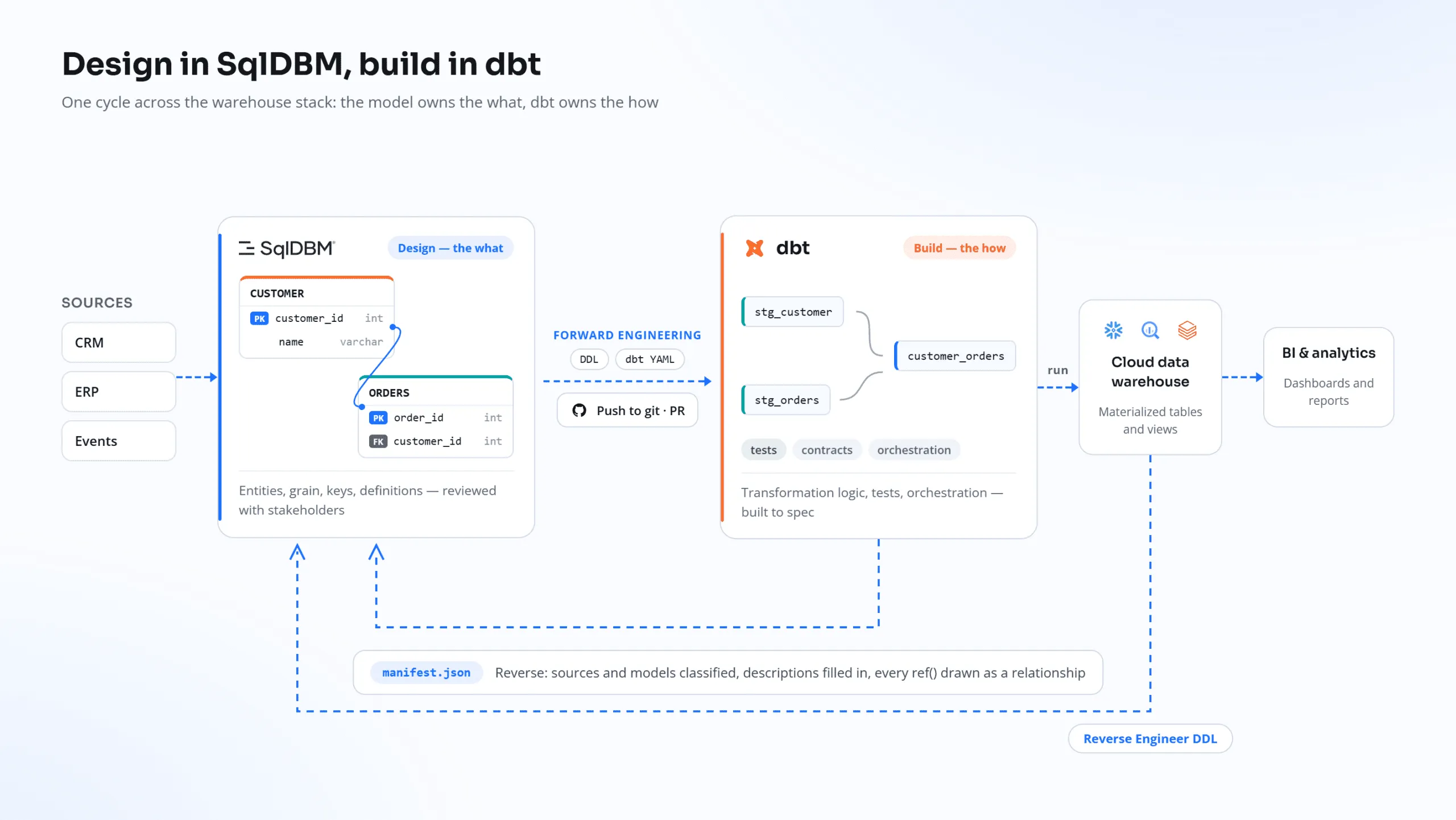
Semantic views and metric views can be edited directly in Snowflake or Databricks, and sooner or later someone will. Using Direct Connect, SqlDBM can reverse-engineer deployed Semantic Views and Metric Views back into the project. Before anything is applied, a consolidated preview lists every difference: new and replaced models, default updates, overrides, relationships, removed items, and warnings. That preview is a drift report. It shows precisely how the deployed object has diverged from the governed definition, and you decide what to accept.
Reverse engineering is also non-destructive by design. Semantic imports never delete physical tables or columns, and a defaults import never removes constraints or relationships.
Between the model and the data beneath it
Structural drift starts upstream, which is exactly why the semantic layer belongs next to the physical model. Because semantic definitions reference the physical tables and columns in the same project, physical changes picked up through reverse engineering, revision compare, or SqlDBM’s DB Schema Monitoring (scheduled jobs that alert recipients when DDL changes) land right next to the semantics that depend on them.
SqlDBM also guards against one of the most damaging structural failures: fan-out from a broken grain. For Snowflake equijoins in a named model, both sides must carry a unique-key constraint (PK, unique key, or virtual equivalent). If one is missing, SqlDBM creates a model-level virtual business key or raises an error in the Errors & Warnings panel. Cardinality is made explicit instead of assumed.
Between revisions
Semantic models are versioned with the rest of the project, supported by Push to Git, and included in branch merges with their own Semantic Models tab showing what was added, updated, and removed. A semantic model is merged together with the objects it references, so a definition can’t arrive in main without the tables it depends on. Every change is intentional, reviewable, and traceable.
Governance built into the definition
Business and governance drift is partly a people problem, but tooling can make the right behavior explicit and visible:
- Verified queries carry their provenance. Each one can record Verified at and Verified by, so a “verified” label is tied to a date and a person rather than living forever.
- Expected values are documented. Sample values and the Is Enum flag make the expected set of values for a dimension explicit, giving reviewers and AI engines a stated contract to check against.
- AI guidance is governed like everything else. Synonyms, descriptions, verified queries, and custom instructions live in the same versioned model as the logic they describe, so a change to a definition and a review of its AI metadata happen in the same place.
- Removal is deliberate. Relationships can be hidden from a specific model without being deleted from the project, and they remain visible (dimmed) so they can be re-included later.
Ossie: semantics without lock-in
The last practice from the original article was to plan for the long haul. The semantic landscape is still settling, and the model you define today will likely need to serve platforms and tools you haven’t chosen yet. A semantic layer locked into a single vendor’s format is just another form of fragmentation waiting to happen.
That’s why SqlDBM supports Ossie (Open Semantic Interchange), the vendor-neutral standard for exchanging semantic models, alongside the native formats:
- Every project supports Ossie. Whether you model in Snowflake, Databricks, or any other supported database, named semantic models can be forward-engineered as Ossie YAML, one file per model.
- Ossie files import cleanly. Reverse-engineer Ossie YAML by upload or paste. A single file containing several models imports as separate semantic models, ready to govern.
- Format-specific properties are never lost. Properties for Cortex, Metric Views, and Ossie are maintained in every project, so a semantic model can move between project types without dropping format-specific settings.
In practice, this means one governed definition can be delivered as a Snowflake Semantic View, a Databricks Metric View, and an Ossie file for any other consumer. Different platforms, same meaning.
On the platform side, forward engineering produces deployable objects directly: Snowflake Semantic Views as CALL SYSTEM$CREATE_SEMANTIC_VIEW_FROM_YAML(...) and Databricks Metric Views as CREATE OR REPLACE VIEW ... WITH METRICS LANGUAGE YAML. The definition you govern is the definition you deploy.
API and MCP: a semantic layer for platforms without one
Not every platform has a native semantic layer to deploy to, and not every consumer of semantics is a person working in the SqlDBM UI. That’s why semantic models are also available programmatically: they can be consumed and updated through both the SqlDBM API and the SqlDBM MCP server.
On Snowflake and Databricks, the governed definition is deployed as a native object. Everywhere else, the API and MCP act as the bridge between the model and the database. A pipeline, a BI tool, or an AI agent can retrieve the governed definition of a metric, along with its joins, synonyms, and verified queries, straight from SqlDBM and apply it against the database, even when that database has no semantic layer of its own. And because updates travel through the same channels, changes made by automation land in the same versioned project as changes made by hand, instead of opening a new place for drift to hide.
Named semantic models aren’t a prerequisite, either. Even in a project without a single named model, the semantic defaults on its tables, columns, and relationships (logical names, semantic types, synonyms, SQL expressions, sample values, and default joins) provide meaningful context to any AI that uses SqlDBM as its source of truth for analysis or validation. An agent asked to explore the data or check a query doesn’t have to guess what a column means. The definition is already there.
Starting from the logical model
Semantics don’t have to wait for the physical model. Logical projects support the full semantic defaults layer, so analytical meaning can be captured at the conceptual design stage alongside entities and attributes. When you export to a Physical project, those defaults travel with the model, matched by entity and attribute name, and stay mapped on every round trip after that. Meaning gets defined once, early, and carried forward instead of reinvented downstream.
From practices to defaults
Here’s how the practices from the original article map to SqlDBM:
| Practice | How SqlDBM supports it |
|---|---|
| Centralize | Semantic defaults defined once on physical objects and inherited by every named model |
| Treat semantics as code | Revisions, Push to Git, and branch merges with a dedicated Semantic Models tab |
| Link semantics to the physical model | Semantics live on the same objects and diagrams as the physical schema |
| Make overrides visible | Override indicators, plus one-click Reset to default and Push to default |
| Detect drift | Reverse-engineering preview against deployed Semantic Views and Metric Views, schema monitoring, and revision compare |
| Protect the grain | Unique-key requirements for Snowflake equijoins, surfaced in Errors & Warnings |
| Govern AI metadata | Verified queries with Verified at and Verified by, sample values, enums, and custom instructions in the same versioned model |
| Plan for the long haul | Ossie in every project, with Cortex and Metric View properties preserved across project types |
Drift can’t be eliminated, because businesses change, data evolves, and people move on. But it can be made visible, contained, and fixed in one place instead of a dozen. That’s what it takes for a semantic layer to scale beyond the first few models. And it’s what keeps the next email from the VP of Sales a thank-you rather than a CC to your boss.
Ready to bring your semantic models under governance? Open a project in SqlDBM, begin by defining some defaults, and create your first semantic model today!